ABBRobot
🌐 KR
Description
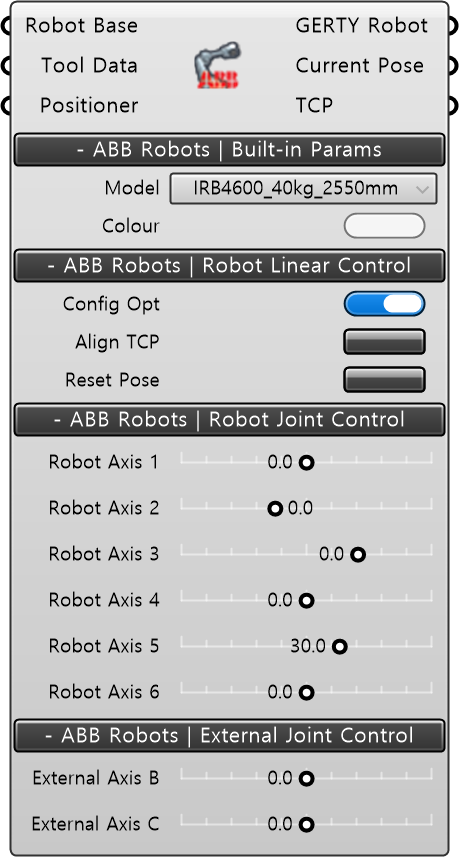
- A component used to manage ABB industrial robots. It allows users to select a specific robot model from 25 supported ABB types and apply the selected model to the simulation environment.
Input
- Robot Base [Optional] : This is the OrientPlane of the robot, with the default being the World Base Plane.
- Tool Data : This takes the input value of ToolData.
- Positioner [Optional] : This connects the additional axis robot data.
ABB Robots | Built-in Params
- Model : Select the ABB industrial robot model.
- Display Colour : Change the robot color.
ABB Robots | Robot Linear Control
- Config Opt : Inverts the rotation values of robot axes 4 and 6 by 180 degrees.
- Align TCP : Aligns the Z-axis of the Tool Center Point (TCP) to the nearest direction.
- Reset Pose : Changes the robot to its default home position.
ABB Robots | Robot Joint Control
- Robot Axis 1 : Sets the 1st axis of the robot model (range: -180° to 180°).
- Robot Axis 2 : Sets the 2nd axis of the robot model (range: -90° to 150°).
- Robot Axis 3 : Sets the 3rd axis of the robot model (range: -180° to 75°).
- Robot Axis 4 : Sets the 4th axis of the robot model (range: -400° to 400°).
- Robot Axis 5 : Sets the 5th axis of the robot model (range: -125° to 120°).
- Robot Axis 6 : Sets the 6th axis of the robot model (range: -400° to 400°).
ABB Robots | External Joint Control
- Robot Axis 1 : Sets the 1st axis of the robot model (range: -180° to 180°).
- Robot Axis 2 : Sets the 2nd axis of the robot model (range: -180° to 180°).
Output
- GERTY Robot : Outputs the configured robot information.
- Current Pose : Outputs the robot axis information.
- TCP : Outputs the TCP information of the tool mounted on the ABB robot.