HotWireToolPathCrvs
🌐 KR
Description
- This component reads the user’s modeled curves and converts them into hot wire tool paths.
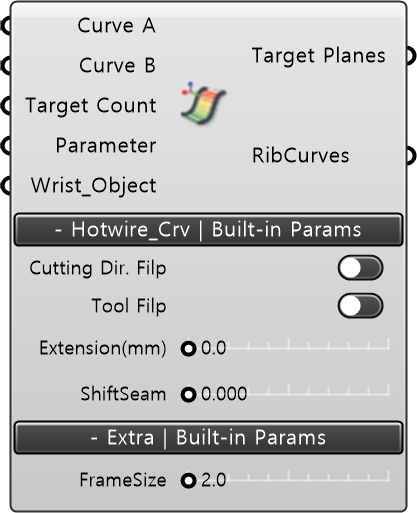
Input
- CurveA [Curve] : Connects the first Curve.
- CurveB [Curve] : Connects the second Curve.
- Target Count [Number / Optional]: Determines the number of hot wire paths.
- Parameter [List / Optional] : Determines the origin positions of the targets on the Ribcurve.
- Wrist Object [Geometry / Optional] : Allows redefining the normal direction of the hot wire path through input values such as point, curve, or line.
Built-in Param | Hotwire Crvs
- Cutting Direction Flip : Reverses the direction of the hot wire cutting path.
- Tool Flip : Rotates the 6th axis, where the hot wire tool (end effector) is mounted, by 180 degrees in the direction of movement.
- Extension(mm) : Determines the distance of the straight path just before entry and exit of the hot wire.
- Shift Seam : Redefines the order of the hot wire cutting sequence on the read planes.
Built-in Param | Extra
- NormalSize : Determines the display size of the normal (Z-axis, normal vector).
Output
- Target Planes : Outputs the hot wire cutting tool paths defined according to the input conditions.
- RibCurves : The unit segments of the Ruled Surface that determine the hot wire path.